PDF Reader: Master Plus
- 3.4
- Rating
- 100.00K
- Installs
- Free
- Price
 Analysis by App-foxy
I approached PDF Reader: Master Plus as a practical tools app rather than as a feature-packed office suite. Its promise is simple: make PDF files easier to open and use on a phone. That sounds modest, but it matters because a PDF reader is often something I reach for in a hurry—when a document arrives in an email, a form needs checking, or I need to read instructions without opening a computer.
My overall impression is that this is best judged by convenience, clarity, and how comfortably it fits into an existing phone routine. It is free, aimed at Everyone, and currently listed as version 1.0.2, so it is easy to try without committing money or rebuilding the way you handle documents. At the same time, I would not treat it as an automatic replacement for a full document-management or editing solution. The right choice depends on whether you mainly need a straightforward reader or expect a complete PDF workspace.
How I would decide whether it belongs on your phone
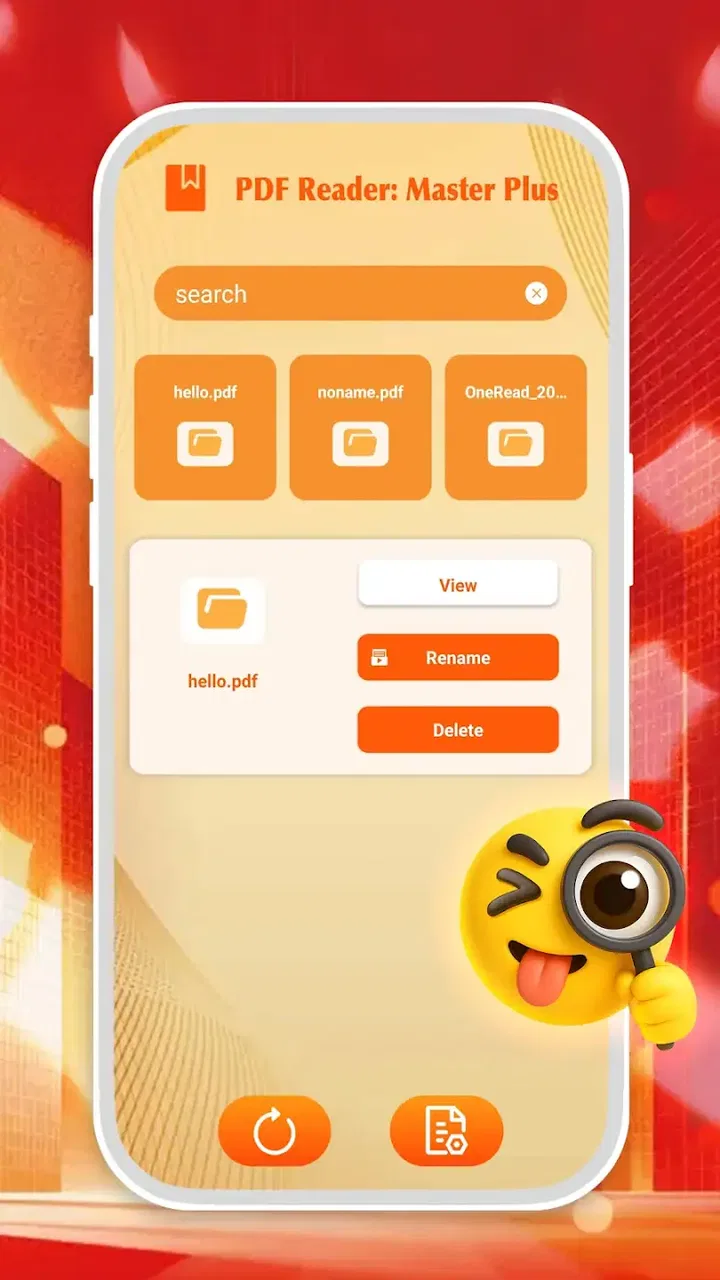
The first question is not whether a PDF app has the longest feature list. It is whether it makes the particular documents you handle less annoying. For occasional reading, the basics carry more weight than advanced tools: opening a file without confusion, moving through pages comfortably, and returning to a document later without having to start the search from scratch.
You May Also Like

 Blood Strike: 2.5 Anniversary
Blood Strike’s Loadouts Turn Every Drop Into a Tactical Gamble
A close look at Blood Strike’s custom loadouts: how fast access to signature weapons reshapes its battle royale rhythm, rewards preparation, and narrows the gap between fights.

 Pandora - Music & Podcasts
Pandora’s Music Is Easy to Start, but Harder to Recover
Pandora’s strength is its low-effort path from a seed to a station. Its weak spot is how much confidence it asks you to place in connection, setup, and quiet recovery.

 8 Ball Pool
 Is Built on Rivalries, Rematches, and Routine
A close look at the rivalries, rematches, shared routines, and unanswered safety questions that turn a quick pool match into a persistent mobile community.

 Samsung Music
’s Quiet Strength Is Playing What You Already Own
Its reach comes less from spectacle than from dependable access to a personal library. That simplicity is both the app’s strongest retention engine and its ceiling.

 AccuWeather: Weather Radar
AccuWeather Review: A Quick, Clear Forecast for Everyday Decisions
For everyday plans, the best forecast is the one you can understand quickly. AccuWeather makes rain timing, radar, and local conditions easy to act on, with a few trade-offs.

 Hill Climb Racing
Why Hill Climb Racing Still Turns Crashes Into One More Run
A tiny car, a bumpy hill and one more upgrade: Hill Climb Racing keeps resurfacing because its simple chaos makes every near-miss feel personal.
More From Our News Desk
View All News


That makes this app a reasonable candidate for people who receive PDFs in ordinary situations. Think of a student checking a course handout, a renter reading a building notice, a traveler opening a booking document, or a small-business owner reviewing a quotation sent as an attachment. In each case, the phone is being used as a quick viewing device, not as a complete publishing workstation.
I also consider the source of the files. If most of your PDFs are already stored on the phone or arrive through other apps, a reader can be useful as the final step in the process. If your documents are spread across several cloud services, shared workspaces, scanners, and office systems, the surrounding workflow may matter more than the reader itself. A lightweight PDF tool can open a file well and still feel limited if you expect it to organize an entire archive.
The developer shown for this app is Kunshan Shengqichang Electromechanical Equipment. The listing places it in the tools category, which matches the way I would use it: as a utility for a specific job, not as a social, creative, or productivity platform that needs daily engagement.
Its public reception is mixed rather than overwhelming. It has a 3.4 average from 317 ratings, with 43 written reviews, and the app has passed 100K+ installs. I read that combination as a reason to test it personally instead of assuming it will suit everyone. There is enough adoption to show that people are trying it, but the average also suggests that expectations should stay practical.
The first-use test I recommend
When I install a new PDF reader, I do not begin with a large archive. I use three files: a short text document, a longer document with many pages, and a form or layout that I need to inspect carefully. This quickly reveals whether page movement feels natural, whether text remains comfortable at different zoom levels, and whether the app behaves sensibly when a file is opened from another application.
With this app, that test is more useful than judging it from the short store phrase “PDF Reader.” A short description tells me the purpose, but not whether the tool fits my habits. I would also open a file directly from the phone’s file picker and then try opening one from an email or messaging app. That distinction matters in daily use: an app can feel fine when browsing locally and less convenient when it is called through Android’s sharing and opening options.
Another sensible check is to notice what happens when a document is no longer needed. I prefer a reader that lets me leave without creating extra copies or making the file location unclear. Since PDF handling often involves downloaded attachments, duplicate files can become a bigger nuisance than the original document. I would therefore keep the first trial small and observe where files appear before moving a large collection into any new app.
Why the simple approach can be valuable
The main strength of a focused PDF reader is reduced mental overhead. When I only want to read a document, I do not necessarily want a full office environment, a subscription prompt, or a long menu of tools competing for attention. A dedicated reader can be the calmer option for quick checks and reference material.
That simplicity is especially useful on a phone with limited storage or on a device shared with family members. The Everyone content rating also makes the app broadly approachable for ordinary household use. I could see it being installed for someone who needs to read official documents but does not want a complicated interface designed around professional document production.
There is also a useful separation between reading and editing. Many people do not need to alter a PDF at all; they simply need to view it reliably. For that audience, choosing a smaller-purpose tool can be more sensible than installing a large suite whose extra capabilities are rarely touched. The trade-off is that the moment the job changes from reading to modifying, signing, converting, or collaborating, the decision needs to be reconsidered.
Where PDF Reader: Master Plus fits best—and where it does not
I use this section to draw a practical boundary: this reader makes the most sense when a PDF is a document I need to open, check, and move on from, rather than the center of a larger workflow. I’d also weigh how often I return to the same files, since that recurring habit—not the novelty of installing another tool—is what determines whether it earns lasting space.
The everyday scenarios where I would choose it
My clearest use case is a document that arrives unexpectedly. Imagine receiving a building maintenance notice while away from a computer. I would open the attachment, scan the pages, zoom into the relevant section, and close it once I understood the date and instructions. For that kind of short interaction, a free reader is appealing because there is no reason to pay for a full office package simply to inspect one file.
A second scenario is study material. A learner may download several handouts and need to read them between classes. A reader can be useful here because the phone is always nearby, but I would still compare the experience with a larger-screen tablet or a dedicated study app. PDFs with dense columns, diagrams, or tiny footnotes are not automatically pleasant on a phone just because they open successfully.
A third scenario is checking work documents before sending them onward. I often want to confirm that a page has not been cut off, that a heading appears correctly, or that an attachment is the right version. A reader is valuable as a final visual check. It is not the same as editing the source document, but it can prevent an embarrassing mistake caused by assuming that an exported file looks correct.
For these situations, the app’s greatest advantage is its narrow purpose. I can approach it as a quick-access utility rather than a complete document office. That is a meaningful win for users who want to read PDFs occasionally and do not need a larger ecosystem around them.
Three practical habits that make the trial more informative
Test files opened from different locations. Open one from local storage and another through the app that delivered it. This shows whether the reader fits your real intake process instead of only working in an idealized browsing path.
Use a long document during the first session. A short file can hide navigation friction. Moving through a larger document tells you whether the app is comfortable for reference material, not just one-page notices.
Check readability before judging speed. Try normal viewing, then inspect a small section such as a table or footnote. If you must constantly pinch and reposition the page, another reader may be better even if both apps technically open the same file.
These are not flashy features, but they reveal the real cost of using a PDF app. The hidden issue is rarely whether a file opens once. It is whether the process remains comfortable after repeated interruptions, downloads, and returns to the same document.
When a different category is the better choice
I would look beyond this app if PDF work is central to my job. People who annotate contracts, fill forms, add signatures, extract pages, convert files, or collaborate with colleagues need to compare it with dedicated PDF editors. Those tools are built around changing documents, while a reader is primarily about viewing them. Installing a reader and expecting it to replace an editor is the kind of mismatch that leads to disappointment.
I would also consider a cloud-focused document app if my files live mostly in shared folders. In that situation, search, permissions, version history, and synchronization may be more important than the reading screen. A local utility can still open individual files, but it may not be the best center for a team-based workflow.
For heavy reading, an e-reader or tablet-oriented solution may offer a more comfortable experience. This is not a criticism unique to this app; PDF pages are often designed for paper or desktop screens. If I regularly read lengthy technical manuals, academic papers, or illustrated books, I would judge the app by sustained comfort rather than by whether it handles a quick attachment.
There is also a case for staying with a PDF viewer already integrated into a broader mobile system. If that existing option opens files quickly, remembers the last location, and covers your needs, switching may create more steps without delivering a meaningful benefit. A new reader should earn its place by making a repeated task easier, not merely by being available.
The real switching cost
Because the app is free, the financial barrier is low. The more important cost is habit. Every PDF reader can change how files are opened, where recent documents appear, and which app responds when you tap an attachment. I would install it without moving my whole collection first, then use it for a few real documents over several days.
That gradual approach also protects against an avoidable organizational problem: losing track of where files are stored. Before adopting any new utility, I would keep important documents in their existing folders and avoid creating a second archive just for testing. If the app becomes my preferred reader, I can then decide whether its browsing approach is worth making part of my regular routine.
Another switching cost is the difference between viewing and acting. If I frequently need to send a document onward, edit it afterward, or return to a particular page, I should test the complete chain rather than only the opening screen. A reader may be perfectly adequate at the first step while forcing me back into another app for everything that follows.
The current version is 1.0.2, so I would keep my expectations measured and pay attention to how it behaves in my own document routine. That does not make it a poor choice; it simply makes a small, realistic trial more sensible than immediately depending on it for important work.
Who should install it now
I would recommend trying it to someone who wants a free, straightforward tool for opening and reading PDF files on a mobile device. It makes the most sense for occasional readers, families sharing ordinary documents, students checking handouts, and workers who need a quick visual inspection before returning to a computer.
I would be more cautious with users who need a predictable professional workflow. If a PDF is part of a legal, financial, academic, or business process where annotations, signatures, file history, or precise page handling are essential, I would compare a dedicated editor or a mature office platform first. In those cases, the reader’s simplicity can become a limitation rather than an advantage.
I would also skip it if I already have a viewer that handles my documents comfortably and integrates with the storage services I use. Switching only makes sense when the current arrangement is frustrating. A free download is easy, but time spent relearning file locations and opening behavior is still a real cost.
For everyone else, the safest recommendation is a focused trial: install it, open the documents you genuinely receive, and judge the experience after several different file types and locations. Do not decide based solely on whether the first page appears. Notice how quickly you can find the right file, whether reading remains comfortable, and whether the app fits the next step in your workflow.
My final view is favorable but deliberately modest. PDF Reader: Master Plus is most convincing as a practical PDF viewing utility, not as an all-purpose document office. Its free price, broad age rating, and simple purpose make experimentation easy, while its 3.4 average means I would not assume it is ideal for every phone or every document habit. If your goal is to read PDFs without adding unnecessary complexity, it is worth a personal test. If your goal is to manage, edit, sign, or collaborate on PDFs, I would choose an alternative category designed for those jobs.
FAQs for PDF Reader: Master Plus
01What features does PDF Reader: Master Plus offer?
PDF Reader: Master Plus offers a comprehensive suite of features designed to enhance your document viewing experience. These include annotation tools, text highlighting, and the ability to fill forms. Additionally, it supports cloud storage integration, making it easy to access your documents from anywhere. The app is also capable of converting other file formats into PDFs.
02Is PDF Reader: Master Plus free to use?
PDF Reader: Master Plus offers both free and premium versions. The free version includes basic features such as viewing and annotating PDFs. However, to unlock advanced features like cloud syncing and document conversion, a subscription to the premium version is required. This subscription is available on a monthly or yearly basis.
03How does PDF Reader: Master Plus handle security?
Security is a top priority for PDF Reader: Master Plus. The app employs encryption to protect your documents, ensuring that your sensitive information remains secure. It also supports password protection for individual files, adding an extra layer of security to your important documents.
04Can PDF Reader: Master Plus be used offline?
Yes, PDF Reader: Master Plus can be used offline for viewing and annotating documents. However, certain features like cloud syncing and downloading files from the internet require an internet connection. This makes it ideal for users who need to work on documents while traveling or in areas with limited internet access.
05Is PDF Reader: Master Plus compatible with all devices?
PDF Reader: Master Plus is compatible with a wide range of devices, including both Android and iOS platforms. It is optimized for smartphones and tablets, ensuring a smooth and user-friendly experience across different screen sizes. Regular updates also ensure compatibility with the latest operating systems.
Pros
- User-friendly interface and navigation.
- Supports various file formats seamlessly.
- Fast document loading and rendering.
- Built-in annotation tools are robust.
- Offline mode for uninterrupted access.
Cons
- Ads can be intrusive at times.
- Limited cloud storage options.
- Some features behind a paywall.
- Occasional crashes on older devices.
- Customization options are minimal.

PDF Reader: Master Plus
Gallery